
Dynago
  • About DYNAGO
  • Our Services
    • System Selection, Quality Assurance Consulting
    • System Implementation
    • Custom Development
    • Support
    • Go Digital with Your Business!
  • Our Solutions
    • Microsoft Business Central
    • Microsoft NAV product suite
    • Microsoft D365 Finance & Operations, (Microsoft Dynamics AX)
    • Microsoft Power BI
    • Microsoft Power Apps
    • Microsoft 365 Office product suite
  • Tips
    • Blog
  • Career
  • Contact
  • MicrosoftPartner
  • EU funding
  • Menu Menu

Posts

dynago

Mobile solutions for Microsoft Business Central: how DynaGo Mobile supports warehouse, manufacturing and service processes

2026.04.29./in Dynago /by dynago
  • DynaGo Mobile is a mobile solution connected to Microsoft Dynamics 365 Business Central that supports warehouse, manufacturing and service processes within a unified framework, enabling companies to work with real-time, up-to-date data in their daily operations.
  • Built on .NET MAUI technology, the solution provides fast, native Android and iOS performance, a single codebase, secure two-way data connectivity, and compatibility with both on-premises and cloud-based environments.
  • DynaGo Warehouse supports warehouse processes from goods receipt, inventory movements, stocktaking and picking through to material consumption in manufacturing, reducing administration and improving accuracy.
  • The Mobile Service application makes field service work more efficient with real-time inventory information, mobile work order management, digital signatures and automated document handling, improving both customer experience and operational efficiency.

The value of enterprise resource planning systems today is no longer defined solely by how accurately they support administrative or financial operations. It is also determined by how well they can reflect real-life, day-to-day operations. For employees working in warehouses, production facilities or in the field, the real advantage comes from being able to access the same up-to-date data and business processes on mobile devices that are managed centrally in the ERP system.


This is the need addressed by DynaGo Mobile, developed by DynaGo Hungary. The solution provides mobile device support for warehouse, manufacturing and service processes connected to Microsoft Dynamics 365 Business Central. Its purpose is to help companies manage processes that take place not in the office, but in field and warehouse environments, more efficiently, more quickly and with fewer errors.

Behind DynaGo Mobile is a technology and development approach that ensures rapid implementation, stable operation, scalability and a modern user experience. One of its key foundations is .NET MAUI technology, which provides an ideal basis for mobile integrations with Business Central.


Why .NET MAUI?

.NET MAUI is a modern, cross-platform development framework that enables native Android, iOS and Windows desktop applications to be built from a single codebase. This offers significant advantages not only from a development perspective, but also in terms of operations, scalability and future enhancements.

One of the technology’s key strengths is that it delivers native performance in both Android and iOS environments, allowing mobile applications to run quickly, stably and reliably.

A unified codebase results in lower development and maintenance costs, as there is no need to maintain separate solutions for each platform. In addition, .NET MAUI supports the creation of modern, fast and flexible user interfaces, which has become a basic expectation for enterprise mobile applications.

Another advantage of the technology is its strong integration capability at API and web service level, enabling secure, real-time connectivity with Business Central. It is also well suited to corporate mobile device fleets and BYOD operating models, where employees use their own devices for work purposes.


The DynaGo framework: a stable connection between Business Central and mobile applications

DynaGo has developed a standard framework that ensures stable, scalable and rapid implementation between Business Central and .NET MAUI-based mobile applications. The framework supports real-time, two-way data communication and synchronization through Business Central Web APIs, while also enabling user, company and permission management.

This approach is particularly important because enterprise mobility is not merely a matter of user interface design. It only works well when it is supported by stable business logic, properly regulated access and reliable data connectivity in the background.

One pillar of the framework is a Business Central extension that can be installed on any standard system, regardless of localization. This Business Central-side solution manages mobile users, permissions related to the mobile application, mobile version control and deployment management, while also supporting two-way communication. A key advantage is that mobile application updates can be managed and automated directly from Business Central, making operations simpler and more secure.


A ready-made mobile foundation for faster development and implementation

The other pillar of the framework is the base mobile application, which accelerates development and deployment with pre-built, professional functions. The system offers a wide range of modern, user-friendly mobile components, including data entry forms, list views, visual UI elements and practical mobile features such as barcode scanning, photo capture and file attachment.

These ready-made elements significantly shorten development time, while ensuring that the resulting solutions meet today’s mobile user expectations.

The application provides a full, secure, two-way connection to Business Central, with authentication supported in both on-premises and SaaS cloud environments.

The system also offers flexible configuration management: multiple Business Central environments can be managed from a single mobile application, configurations can be saved, and they can be shared with other devices via QR code. This is especially useful when rolling out the solution quickly to larger teams. The framework also provides a default menu structure and easy-to-use developer navigation tools, making it simple to build workflows between different application screens.


Warehouse mobile solution: real-time inventory management and efficient material handling

Efficient warehouse operations play a key role in the everyday performance of any manufacturing, trading or logistics company. Manual administration, paper-based processes and outdated inventory information can easily lead to errors, slower service and rising costs.
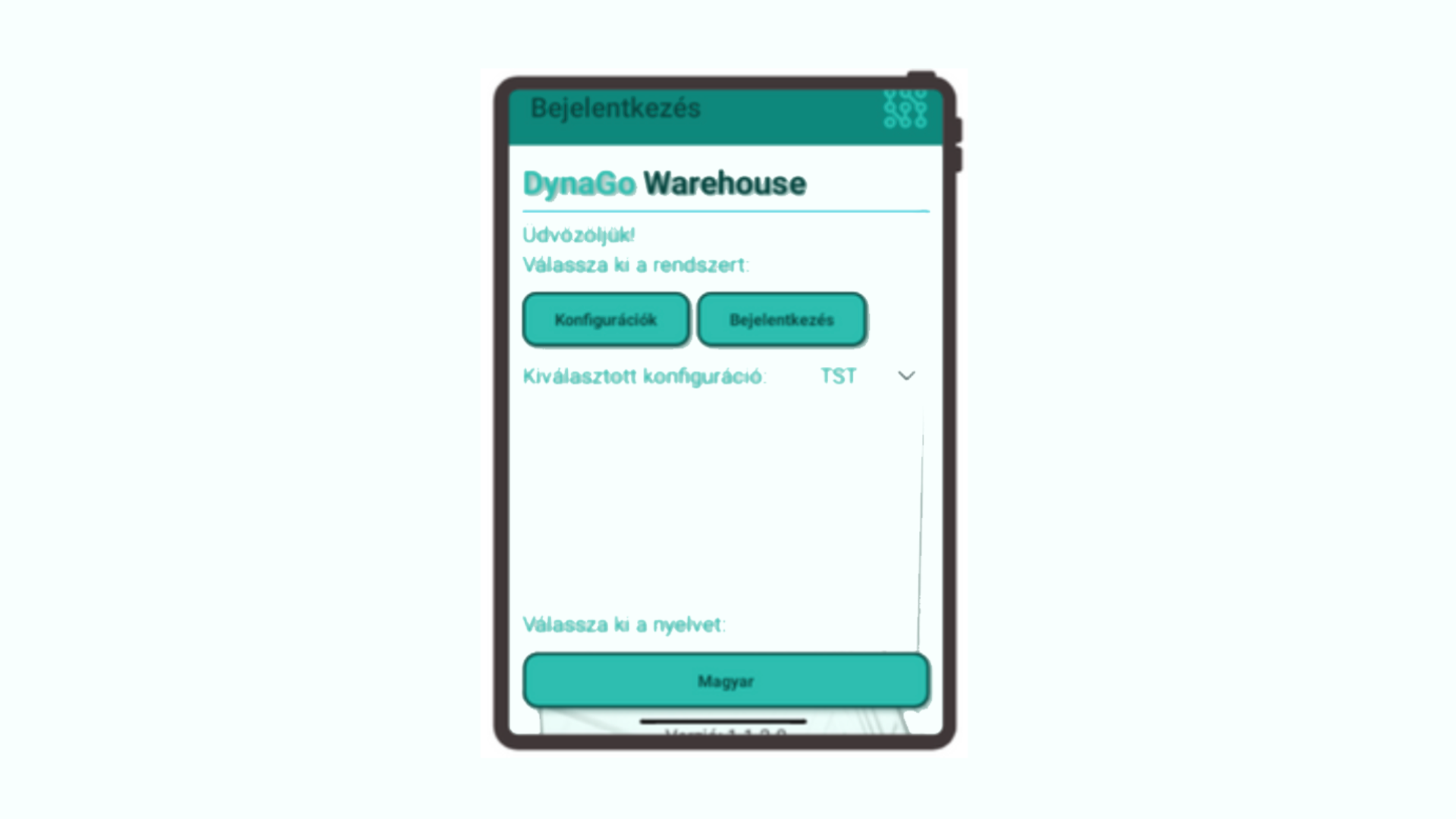
DynaGo Mobile’s warehouse solution, DynaGo Warehouse, is a modern application developed with .NET MAUI technology and running natively on Android and iOS devices. It integrates directly with the Microsoft Dynamics 365 Business Central ERP system. The solution provides real-time data management for logistics teams and supports processes with mobile technologies from goods receipt through to delivery.

The system’s most important advantage is that it makes real-time inventory information available anywhere in the warehouse, while enabling paperless, automated processes.

Barcode and QR code support enables faster and more accurate work, while direct posting to Business Central minimizes administration. The solution also provides transparent task management, process tracking, and flexible role and permission management through the mobile interface.


Warehouse user management and role-based operation

The interface configured in Business Central makes it possible to set up warehouse users and profiles, display functions on mobile devices based on user roles, define individual default warehouses and journal settings, and configure printers by user.

As a result, users only see the processes relevant to them, through a simple and transparent interface.


Mobile goods receipt and put-away

The system supports document-free recording of purchase orders from a mobile device. Receipt data, such as delivery note information, vehicle details and dates, can be entered directly in the mobile application. Goods receipt can also be managed at line level, allowing quantity, bin, batch and expiration data to be recorded accurately.

Once the data has been entered, automatic posting in Business Central can be completed with a single click.

The process is further accelerated by support for printing and reprinting barcode labels directly from the mobile device.
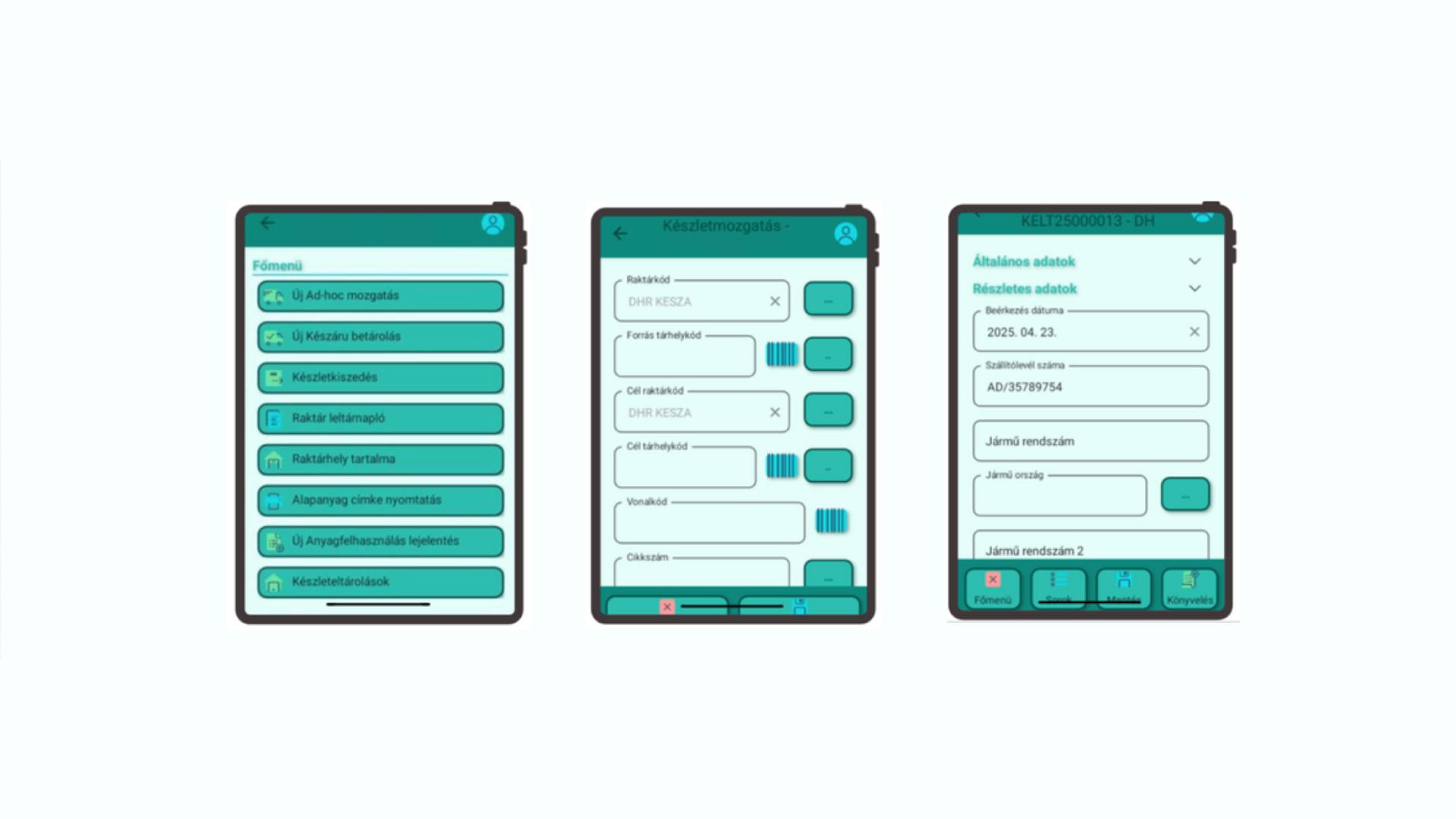
 

Bin content lookup and real-time inventory visibility

DynaGo Warehouse enables users to check the contents of warehouse bins and view real inventory information using various filtering options.

Users can search by item number, bin, batch or variant, allowing them to access the necessary data quickly and accurately.


Ad hoc material movements

The system also supports ad hoc material movements using barcode-based identification. This includes bin-to-bin and warehouse-to-warehouse movements, together with quantity and inventory checks. As a result, flexibility and accuracy are both maintained in daily operations.


Material consumption for manufacturing

The solution is also suitable for supporting manufacturing processes. A production order can be identified by barcode, after which the bill of materials lines are displayed and material consumption can be recorded. The system supports FIFO logic and automatically creates the necessary journals in Business Central.

This makes the administration of manufacturing-related material movements faster and more accurate.


Finished goods put-away

Products received from production can also be handled securely from a mobile device. Finished goods can be identified by barcode, the target bin for put-away can be specified, and the system supports secure storage even before posting takes place.


Picking and status tracking

During picking processes, users can list assigned tasks, check and approve quantities and bins, and manage partial quantities as well.

The system provides automatic status management, making tasks clearly traceable through “New,” “In progress” and “Completed” statuses.


Stocktaking with mobile barcode scanning

Stocktaking works on an inventory order basis and enables the identification of the bin, item and batch even with a single scan. This significantly speeds up the process while ensuring accurate result recording.


The technological foundations of the warehouse solution

The technology behind DynaGo Warehouse translates directly into business benefits. .NET MAUI provides native Android and iOS performance from a single codebase. Business Central Web API integration ensures real-time data connectivity. Barcode and QR code support enables the use of both the device camera and external scanners. Support for cloud and on-premises Business Central environments means the solution can be adapted to virtually any infrastructure.


Who is DynaGo Warehouse recommended for?

The solution is especially useful for manufacturing and food industry companies, commercial and logistics centers, and businesses with a service background.

It can be particularly beneficial for companies operating across multiple sites and handling high volumes of goods.


Mobile service solution: efficient work order management and field support

DynaGo Mobile provides advantages not only in warehouse and manufacturing-related processes, but also directly supports the work of field service technicians. The efficiency of service technicians has a major impact on customer service, cost efficiency and response times. Paper-based reports, inaccurate data transfer and subsequent administration all cause time losses, while customers increasingly expect immediate, transparent communication and documented work execution.

The Mobile Service application, built on .NET MAUI technology, addresses these challenges through close integration with Microsoft Dynamics 365 Business Central.
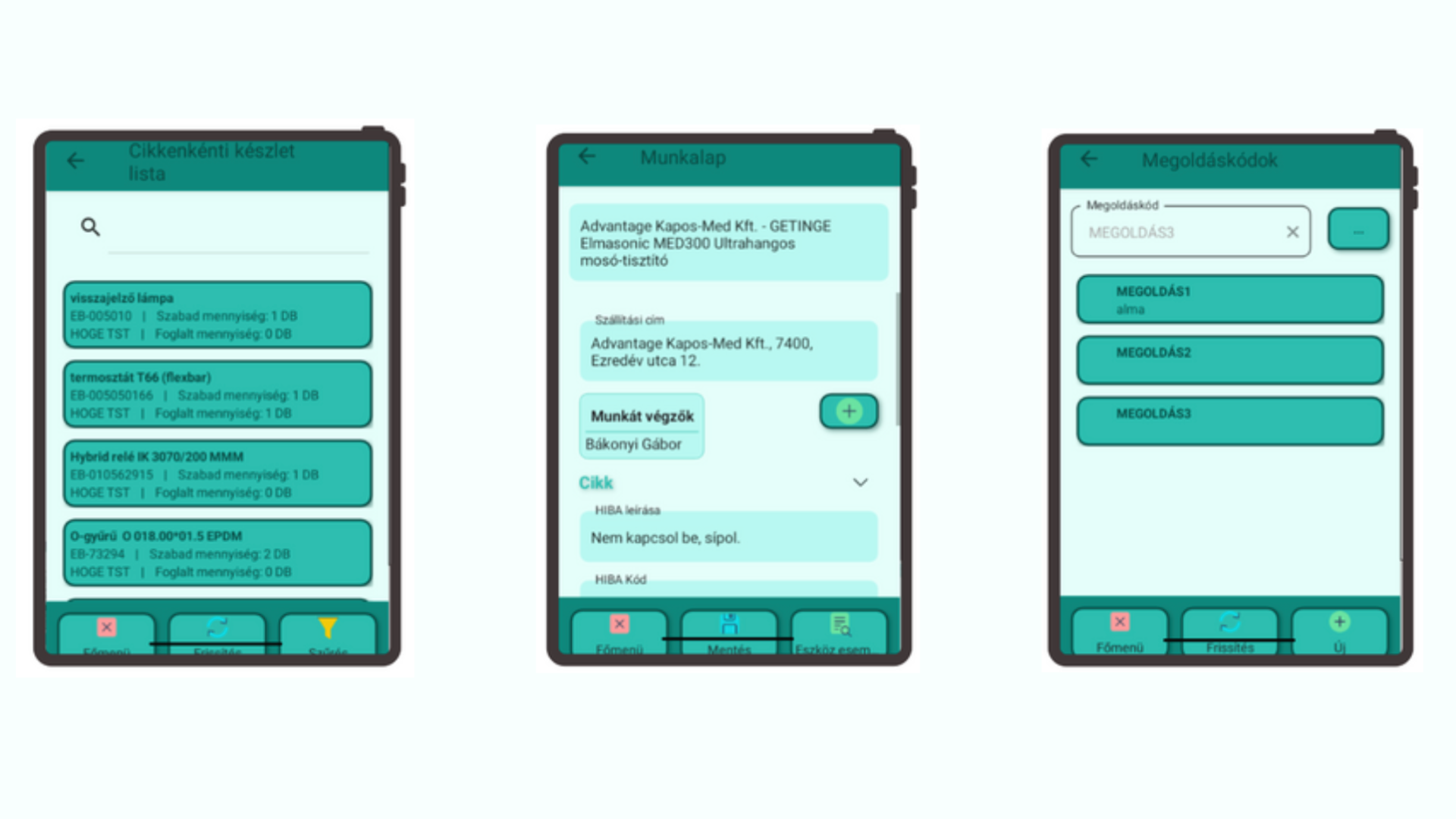
The application provides comprehensive field support for service processes: from creating work orders and recording materials used to accessing real-time inventory information and automatically generating a signed work order in PDF format.


Real-time inventory information for field technicians

A service technician can immediately check which spare parts and materials are available in their vehicle, even across multiple companies, provided a unified warehouse code structure is in place. The available data includes item ledger entry details such as batch number, quantity and shipping address.

This is particularly important because technicians can see exactly what is available to them on site. As a result, service response time is reduced and unnecessary spare part orders can be avoided.


Mobile work order management

The mobile application enables work orders to be started and managed from a mobile device, with changes appearing in Business Central in real time. Work orders recorded in Business Central can be assigned to service technicians, materials used and working time can be recorded immediately and without paper, and work order data is continuously synchronized between the two systems.

The process also allows the customer to digitally sign the work order on the mobile device.

This makes the service process faster, more transparent and more accurate, while billing can also be prepared automatically.


Custom work order PDF template and automated document management

The system automatically generates a PDF document from the signed work order in a custom, company-specific format. This document can be uploaded to the appropriate document repository, attached as an invoice attachment, and even sent immediately to the customer by email from the mobile application.

This not only significantly accelerates administrative processes, but also provides a professional customer experience.


Equipment history and event log

One of the key advantages of the mobile service application is that it makes previous service dates, earlier work order IDs, and the parts and operations used searchable for every service item. This makes troubleshooting easier, supports the handling of recurring issues, and significantly improves service efficiency.

 

Business benefits of the service solution

By using the system, the administrative burden is significantly reduced and paperless operation becomes possible. Field service work becomes faster, customer communication improves, inventory information becomes more accurate, and the number of unsuccessful service visits is reduced.

Automated document management enables faster invoicing, while service data becomes more transparent and customer history easier to track. Together, these benefits significantly improve both the customer experience and traceability.


Who is the Mobile Service application ideal for?

The solution can be an ideal choice for companies providing contracted or ad hoc service activities, businesses with many mobile technicians working in the field, organizations maintaining high-value equipment with long lifecycles, and service companies managing multiple companies and sites.

For more information about any of the solutions, or to learn how DynaGo Mobile can be integrated into your own business processes, contact our experts at dynago@dynago.hu.

https://dynago.hu/wp-content/uploads/2026/04/DYNAGO-2.png 1080 1920 dynago https://dynago.hu/wp-content/uploads/2021/08/logo_szines_340px.svg dynago2026-04-29 11:52:512026-04-29 11:52:51Mobile solutions for Microsoft Business Central: how DynaGo Mobile supports warehouse, manufacturing and service processes
dynago

Newsfeed in the Dynago Package – Making the Full Story of a Business Case Visible

2026.03.17./in Dynago /by dynago
  • Thanks to the Dynago Newsfeed feature, all events, discussions, and documents related to a business record are available in one place within Microsoft Dynamics 365 Business Central.
  • The full history of a case can be followed in a chronological timeline within the system.
  • Notes, meetings, emails, and documents can be directly recorded and linked to the given record.
  • This enables faster information retrieval and more transparent collaboration across teams.

The Newsfeed feature in the Dynago package for Microsoft Dynamics 365 Business Central addresses a common gap in ERP systems: while structured data is well managed, the context behind business processes is often scattered across emails, calls, and separate documents. The Newsfeed brings these elements together, allowing all events, notes, and documents related to a business record to appear in one place.


Within Business Central, users can follow the full history of a case in a chronological timeline. Whether it is a sales order, project, purchase, or opportunity, the system not only displays key data fields but also the underlying discussions, decisions, and updates that shaped the process. This provides a more complete view of business activities and helps teams quickly understand what has happened and why.

The feature allows users to create structured notes, record meeting summaries, and attach relevant documents directly to the given record. Instead of searching through inboxes or shared drives, all important information remains accessible within the ERP environment. This significantly improves traceability and reduces the risk of information loss.

Search functionality further enhances usability by making it easy to retrieve past discussions or decisions, even in long-running or complex projects. As more information accumulates over time, this becomes increasingly valuable for maintaining continuity and supporting informed decision-making.

The Newsfeed also strengthens collaboration across teams. Since all relevant information is linked to the same business record, different departments—such as sales, procurement, or project teams—can work with the same context. This ensures better alignment, smoother handovers, and more transparent communication throughout the organisation.

By integrating both structured data and process-related information, Business Central evolves from a traditional ERP system into a more comprehensive collaboration platform.

The Newsfeed helps companies not only manage transactions, but also capture the full story behind them—making everyday operations more efficient, traceable, and easier to manage.

If you would like to explore how the Dynago Newsfeed can support your workflows and improve collaboration in your organisation, DynaGo’s experts can help you identify the best approach and unlock its full potential.


Thumbnail: Unsplash

https://dynago.hu/wp-content/uploads/2026/03/microsoft_unsplash.png 1080 1920 dynago https://dynago.hu/wp-content/uploads/2021/08/logo_szines_340px.svg dynago2026-03-17 10:53:082026-03-17 10:55:40Newsfeed in the Dynago Package – Making the Full Story of a Business Case Visible
dynago

Unlock the Future of Business: Copilot Now Available in the Hungarian Localization of Business Central

2025.02.27./in Dynago /by dynago

We are pleased to announce that thanks to Microsoft’s latest development, the Copilot feature is now available in the Hungarian localization of Business Central. With the 2024 wave 2 (BC25.3) version, this innovative solution has been introduced in Hungary, offering unprecedented efficiency in enterprise resource planning. We have already installed and made the feature available for our SaaS customers, allowing them to be among the first to benefit from this AI-powered assistant. But what exactly can it do?


Introducing Copilot

Copilot is an AI-powered assistant designed to enhance creativity, boost productivity, and eliminate monotonous, time-consuming tasks.

Integrated into the Business Central system, Copilot enables users to ask questions in natural language and quickly access their business data.

For example, users can simply type: “Show me the latest sales order for Adatum,” and the system will immediately retrieve, group the data, perform calculations, and generate detailed analyses. This allows users to obtain relevant information in seconds without needing to use complex search commands.

Copilot is an AI-powered assistant designed to enhance creativity, boost productivity, and eliminate monotonous, time-consuming tasks. (Photo: Microsoft)


What Benefits Does Copilot Offer to Hungarian Users?

The introduction of this new feature represents a major advancement for businesses, providing opportunities that previously required manual work and time-consuming analysis. One of its most outstanding advantages is natural language search, which allows users to access their company data using simple words or questions, without the need to write complex SQL queries similar to programming languages. This significantly reduces search time and enables faster, more informed business decisions.

Another key advantage is real-time data processing, which ensures that Copilot immediately processes requests and provides users with the most accurate information possible. As a result, managers and employees can quickly respond to market changes and adapt to new situations instantly.

While Copilot operates primarily in English, it also supports searches in other languages, including Hungarian. However, it is important to note that linguistic quality and accuracy may differ from the English version, which could affect the user experience. Despite this, the new feature can still be a great asset for Hungarian businesses, offering significant time savings through automated searches and analyses.


How to Activate Copilot in Business Central?

To access and use Copilot, businesses must be running the latest version of Business Central. With the 2024 wave 2 (BC25.3) update, the feature has officially become available in Hungary and has already been installed for our SaaS customers.

If you need assistance with the update or activation of the feature, the DynaGo Hungary customer service team is ready to help. It is worth integrating Copilot into daily workflows as soon as possible, as it can boost efficiency even in the short term.


Step into the Future with Copilot!

Don’t miss the opportunity to support your business with the most advanced technology! Integrated into the Hungarian localization of Business Central, Copilot takes business processes to the next level, reducing manual work, optimizing operational workflows, and gaining a competitive advantage in the digital age. Not only does it save time, but it also allows employees to focus on more valuable, strategic tasks.

Accelerating digital transformation is crucial for your business—implementing Copilot is a significant step in this direction. If you would like to learn more about this feature, feel free to contact us!


Thumbnail: Microsoft

https://dynago.hu/wp-content/uploads/2025/02/copilot_microsoft.png 1080 1920 dynago https://dynago.hu/wp-content/uploads/2021/08/logo_szines_340px.svg dynago2025-02-27 11:44:352025-02-27 12:07:05Unlock the Future of Business: Copilot Now Available in the Hungarian Localization of Business Central
dynago

Azure AI OCR and Business Central Integration – A New Level of Digitalization

2025.01.30./in Dynago /by dynago

Digital transformation is crucial for modern businesses, and one of the most innovative solutions is Azure AI OCR (Optical Character Recognition). This technology automates text extraction from various document formats, reducing manual data entry and enhancing business efficiency. When integrated with Microsoft Dynamics 365 Business Central, OCR automation makes administrative processes more accurate and transparent.


How Azure AI OCR Works

Azure AI OCR leverages machine learning models to recognize both printed and handwritten text in multiple languages. Through Intelligent Document Processing (IDP), it extracts key elements and structural information from documents, supporting both real-time and background processing.


Key Benefits of Integration with Business Central

By digitizing and automatically processing incoming documents like invoices, delivery notes, and orders, businesses significantly reduce administrative workload. The integration allows:

  • Direct connection of OCR APIs to Business Central, enabling seamless data transfer.
  • Structured and accurate data extraction for better business management.
  • Various plugins and extensions for smooth interoperability.


Integration Process

  1. Document Digitization – Paper-based or digital files are uploaded into Azure AI OCR.
  2. Data Extraction & Processing – AI models identify key information and convert it into structured data.
  3. API Integration & Data Transfer – Extracted data (formatted in JSON) is automatically transmitted to Business Central.
  4. Validation & Workflow Automation – Data is validated, processed, and used in purchasing, finance, or inventory management modules. Business Central sends alerts if any data correction is needed.


Business Advantages of Digitalization

  • Reduced Errors & Faster Processing – Automation eliminates manual entry mistakes.
  • Cost Efficiency – Employees can focus on high-value tasks instead of repetitive data entry.
  • Real-Time Updates – Businesses access up-to-date information instantly.


Practical Example: Automated Invoice Processing

  1. A supplier’s paper invoice is digitized and uploaded to the OCR system.
  2. OCR extracts details (invoice number, date, supplier name, item descriptions, amounts).
  3. Data is formatted in JSON and sent to Business Central via API.
  4. Business Central updates procurement and finance records and triggers approval workflows if needed.
  5. The system notifies users for validation, ensuring accuracy.


Conclusion

Azure AI OCR and Business Central integration streamlines business document processing, minimizes human intervention, and enhances administrative transparency. This collaboration not only improves efficiency but also drives digital transformation. The system can be customized for specific business needs, with expert guidance available from DynaGo for implementation.


Thumbnail: Unsplash

https://dynago.hu/wp-content/uploads/2025/01/laptop_unsplash-1-scaled.jpg 1440 2560 dynago https://dynago.hu/wp-content/uploads/2021/08/logo_szines_340px.svg dynago2025-01-30 14:54:462025-02-27 11:42:24Azure AI OCR and Business Central Integration – A New Level of Digitalization
dynago

Exploring Dynamics 365 Business Central 2024 Release Wave 2 (BC25): A Comprehensive Overview

2024.12.13./in Dynago /by dynago

The 2024 Release Wave 2 for Microsoft Dynamics 365 Business Central introduces powerful features aimed at enhancing efficiency and productivity for small and medium-sized businesses (SMBs). This release focuses on streamlining operations, improving usability, and integrating advanced AI capabilities. Here are the key highlights.


General Enhancements

Full-Text Search for Enhanced Usability

The updated search functionality replaces the older exact-match “legacy” system with a modern, full-text indexed approach. This allows for more intuitive searches based on linguistic rules, supporting flexibility such as phrase searches with quotation marks. For example, searching “London chair” will locate a product named “LONDON Swivel Chair,” a task the legacy system could not perform. On-premises installations require SQL Server Full-Text Search to enable this feature.

Copilot Integration: Streamlining Repetitive Tasks

The AI-driven Copilot introduces:

  1. Sales Line Suggestions: Automatically generates sales lines from free text or file inputs, reducing manual data entry and errors.
  2. Natural Language Data Queries: Users can type commands like “Show suppliers by location, sorted by purchase amount,” enabling quick insights without complex setups.
  3. Effortless Numbering Series Management: Copilot simplifies creating and modifying numbering sequences through an intuitive interface.

Drag-and-Drop File Attachments

Users can now attach multiple files to a record simultaneously, enhancing workflow efficiency, particularly for document-heavy tasks.

Innovations in Project Management

Extended Text for Project Planning

Project planning lines now support detailed text entries, improving communication with clients, suppliers, and internal teams.

Streamlined Purchase Orders

Purchase orders can now be created directly from projects using intelligent algorithms that assess supply and demand, ensuring seamless project execution without complex setup.


Service Management Enhancements

Service Document Archiving

New version control capabilities automatically archive service documents at key stages, such as when converting quotes to orders or posting service orders, mirroring functionality in sales and purchasing modules.

Improved Service Contract Management

A list view of archived service contracts offers better accessibility and organization, streamlining contract oversight.


Advanced Subscription Billing

The enhanced subscription billing module supports flexible pricing, automated renewals, and customizable billing periods. By centralizing contract data, this feature streamlines processes from initial sales to recurring invoices, reducing manual effort and improving accuracy.


Conclusion

The Dynamics 365 Business Central 2024 Release Wave 2 delivers features that cater to SMBs’ evolving needs, from AI-driven tools to improved project and service management. These innovations enhance efficiency and ensure Business Central remains a top choice for managing and optimizing operations.

https://dynago.hu/wp-content/uploads/2024/12/sunrise-king-NK-cB-l1cv0-unsplash-1-scaled.jpg 1440 2560 dynago https://dynago.hu/wp-content/uploads/2021/08/logo_szines_340px.svg dynago2024-12-13 18:16:162024-12-13 18:16:16Exploring Dynamics 365 Business Central 2024 Release Wave 2 (BC25): A Comprehensive Overview
dynago

From On-Premises to Cloud: Transitioning to Business Central’s Online Version

2024.11.28./in Dynago /by dynago

In today’s digital age, cloud-based systems offer businesses significant advantages in data management, process automation, and efficiency. Companies relying on on-premises systems often encounter challenges like outdated technology, limited scalability, and high maintenance costs. Transitioning to the Microsoft Dynamics 365 Business Central online version not only addresses these issues but also delivers substantial business benefits.


Why Switch?

Cloud systems have become essential for modern businesses, and Business Central’s online version provides several key advantages.


1. Up-to-Date Technology

The online version offers automatic updates, ensuring access to the latest features, developments, and security measures. This is especially important in the age of increasing cyber threats, as outdated software poses serious risks.

2. Flexible Access

With internet access, businesses can access their data anytime, anywhere—ideal for hybrid or remote teams. The platform is optimized for mobile devices, empowering on-the-go employees like sales teams.

3. Cost Efficiency and Scalability

Cloud systems eliminate the need for extensive on-site infrastructure, reducing hardware and maintenance expenses. The subscription model provides cost transparency, while scalability ensures the system grows alongside the business.

4. Integration with Microsoft Solutions

Business Central integrates seamlessly with Office 365, Power BI, and other Microsoft tools, streamlining workflows and enabling real-time reporting.

5. Enhanced Data Security

Hosted on Microsoft Azure, one of the most secure cloud infrastructures globally, the system ensures compliance with strict data protection standards. Automatic backups minimize downtime risks.


Transitioning to the Online Version

The migration to Business Central online is a structured process designed to minimize disruptions. Here’s how it unfolds:


1. Preparation

Data is cleaned, errors are corrected, and the on-premises system is updated to the latest version. Businesses should evaluate how the online system can align with their goals.

2. Migration Settings

Microsoft provides built-in tools to simplify data migration. These tools identify potential compatibility issues and ensure seamless data compression and transfer.

3. Data Replication

Critical to the transition, data is carefully transferred to ensure integrity. The process can be phased to reduce risks.

4. Testing and Optimization

Both pre- and post-migration, the system undergoes thorough testing to verify data accuracy and optimize workflows.

5. Go-Live

Once the migration is complete, businesses fully transition to the online version, retiring the on-premises system.


Key Considerations

To ensure a smooth transition, businesses should verify compatibility for existing customizations and extensions. A solid migration strategy—such as using Azure SQL-based backups—can enhance speed and security.


Why Transition Now?

The rapid pace of technological advancements makes timing crucial. Moving to the cloud modernizes IT systems, offering a competitive edge. Cloud-based ERP systems improve process management, agility, and responsiveness to market changes.

Every day spent on outdated systems could mean lost opportunities. Contact the experts at Dynago to guide you through the transition. From planning to implementation, they tailor the process to your needs, allowing you to focus on business development. Reach out for a consultation today!

https://dynago.hu/wp-content/uploads/2024/11/kari-shea-1SAnrIxw5OY-unsplash-scaled.jpg 1440 2560 dynago https://dynago.hu/wp-content/uploads/2021/08/logo_szines_340px.svg dynago2024-11-28 12:19:132025-03-18 09:02:59From On-Premises to Cloud: Transitioning to Business Central’s Online Version
ERP
dynago

How can ERP help in a recession?

2022.11.30./in Uncategorized /by dynago

The much talked about recession has arrived, and though we don’t know exactly how long stays with us, all market players, regardless of industry or size, better be prepared to deal with it. But by taking conscious actions, we can ensure that our company can weather the period in the best possible way. The success of our crisis management will also depend on what extent we dare to rely on the opportunities offered by technology.

Since cloud enterprise resource planning (ERP) stores real-time information about every department in the company, and provides continuous access to data anytime, anywhere, it is a powerful tool for analyzing our operations, forecasting and preparing for challenging times. In our article we showcase how cloud ERP can help us identify the most valuable areas of our business, help us in inventory management or monitor debts and incoming payments anywhere, anytime, thus keeping our company resilient in challenging economic environment as well.

https://dynago.hu/wp-content/uploads/2022/11/dynago-ERP02.png 426 640 dynago https://dynago.hu/wp-content/uploads/2021/08/logo_szines_340px.svg dynago2022-11-30 10:00:312022-11-29 12:47:57How can ERP help in a recession?

Latest posts

  • DynaGo Hungary wins Business Superbrands award
  • Mobile solutions for Microsoft Business Central: how DynaGo Mobile supports warehouse, manufacturing and service processes
  • Newsfeed in the Dynago Package – Making the Full Story of a Business Case Visible
  • How Business Central Copilot Transforms Work for Hungarian Companies
  • Felhő, AI és sikeres bevezetés: ki marad talpon a digitalizációs versenyben? – Kulcsár Melinda a Norex ERP Podcastben

Kategóriák

  • Dynago
  • Uncategorized

Címkefelhő

AI-generated insights AI in accounting AI in finance AI in procurement AI product descriptions bank statement automation Business Central business process automation business processes cloud cloud ERP collaboration customer focus data data-driven decision-making data quality digital transformation digital transformation Hungary document management DynaGo DynaGo Hungary enterprise AI tools enterprise resource planning ERP ERP system ERP update ERP upgrade field operations Hungarian VAT rules inventory optimisation market presence Microsoft Microsoft Business Central Microsoft Dynamics 365 Microsoft Dynamics 365 Business Central mobile ERP system natural language ERP queries Newsfeed NTCA Online Invoice professional recognition quality real-time data processing reliability SaaS ERP VAT compliance

Privacy policy

Copyright 2021 Dynago

Scroll to top
Weboldalunk működtetése során a felhasználói élmény növeléséhez illetve a jobb kiszolgálás érdekében oldalunk “cookie”-kat használ. További információk
BeállításokElfogadom
Manage consent

Privacy Overview

This website uses cookies to improve your experience while you navigate through the website. Out of these, the cookies that are categorized as necessary are stored on your browser as they are essential for the working of basic functionalities of the website. We also use third-party cookies that help us analyze and understand how you use this website. These cookies will be stored in your browser only with your consent. You also have the option to opt-out of these cookies. But opting out of some of these cookies may affect your browsing experience.
SAVE & ACCEPT
  • English