
Dynago
  • About DYNAGO
  • Our Services
    • System Selection, Quality Assurance Consulting
    • System Implementation
    • Custom Development
    • Support
    • Go Digital with Your Business!
  • Our Solutions
    • Microsoft Business Central
    • Microsoft NAV product suite
    • Microsoft D365 Finance & Operations, (Microsoft Dynamics AX)
    • Microsoft Power BI
    • Microsoft Power Apps
    • Microsoft 365 Office product suite
  • Tips
    • Blog
  • Career
  • Contact
  • MicrosoftPartner
  • EU funding
  • Menu Menu

Posts

dynago

AI Agents in Practice: When Artificial Intelligence Does More Than Just Respond — It Gets Work Done

2026.10.19./in Dynago /by dynago

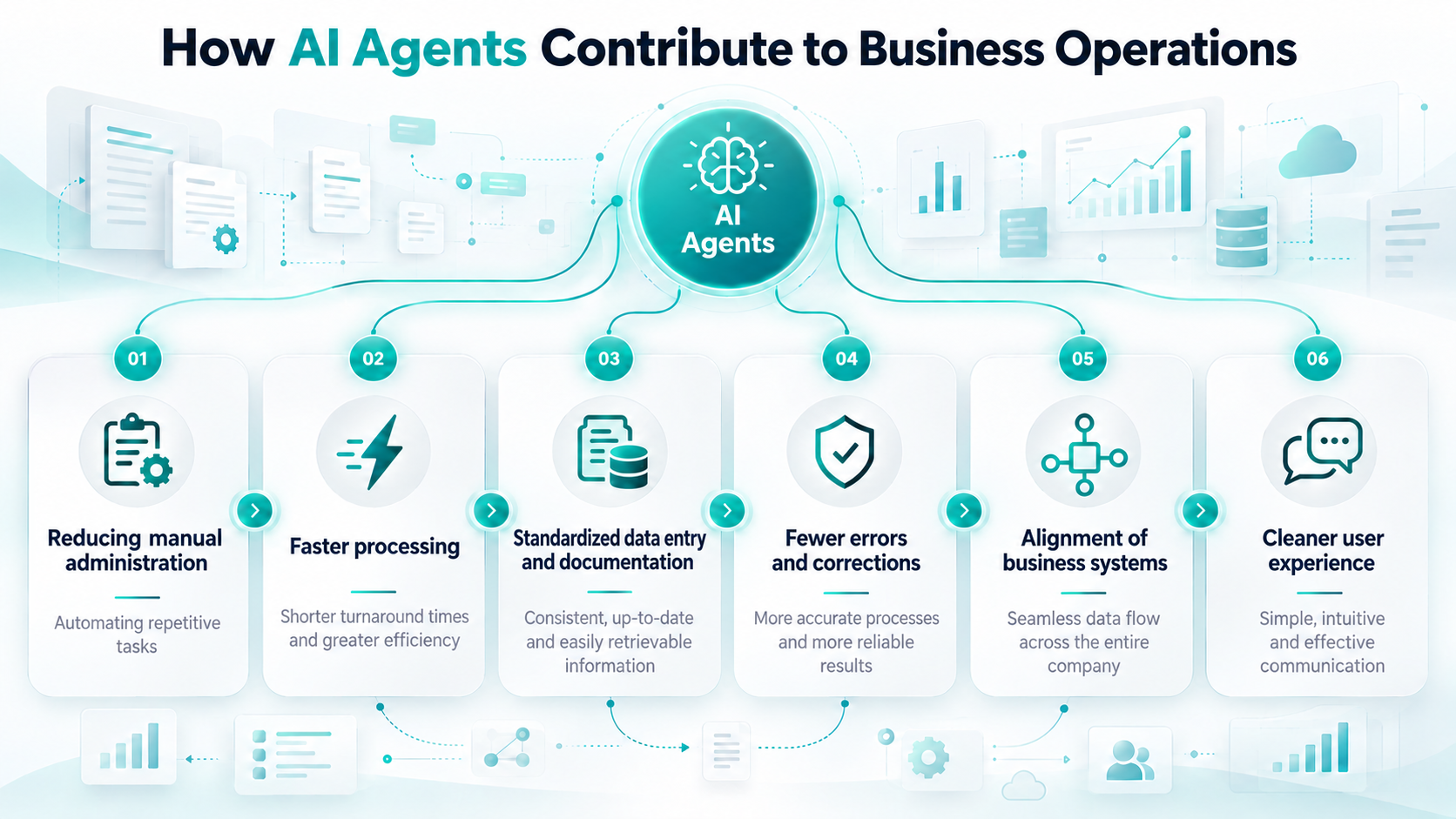
AI agents can support employees across a wide range of areas, from accessing corporate knowledge and managing customer communication to executing business processes. Well-designed agents can work with predefined corporate information sources, collect data, perform checks, and initiate controlled workflows.


We have previously discussed the differences between Copilot and AI agents in our article on Business Central. While chatbots answer questions, generate text, or summarize documents, agents can connect natural-language interaction with corporate documents and business systems such as Microsoft 365, SharePoint, or Microsoft Dynamics 365 Business Central.

What is more, their operation can be tailored to the company’s own rules, processes, and knowledge base.
Corporate knowledge from controlled sources

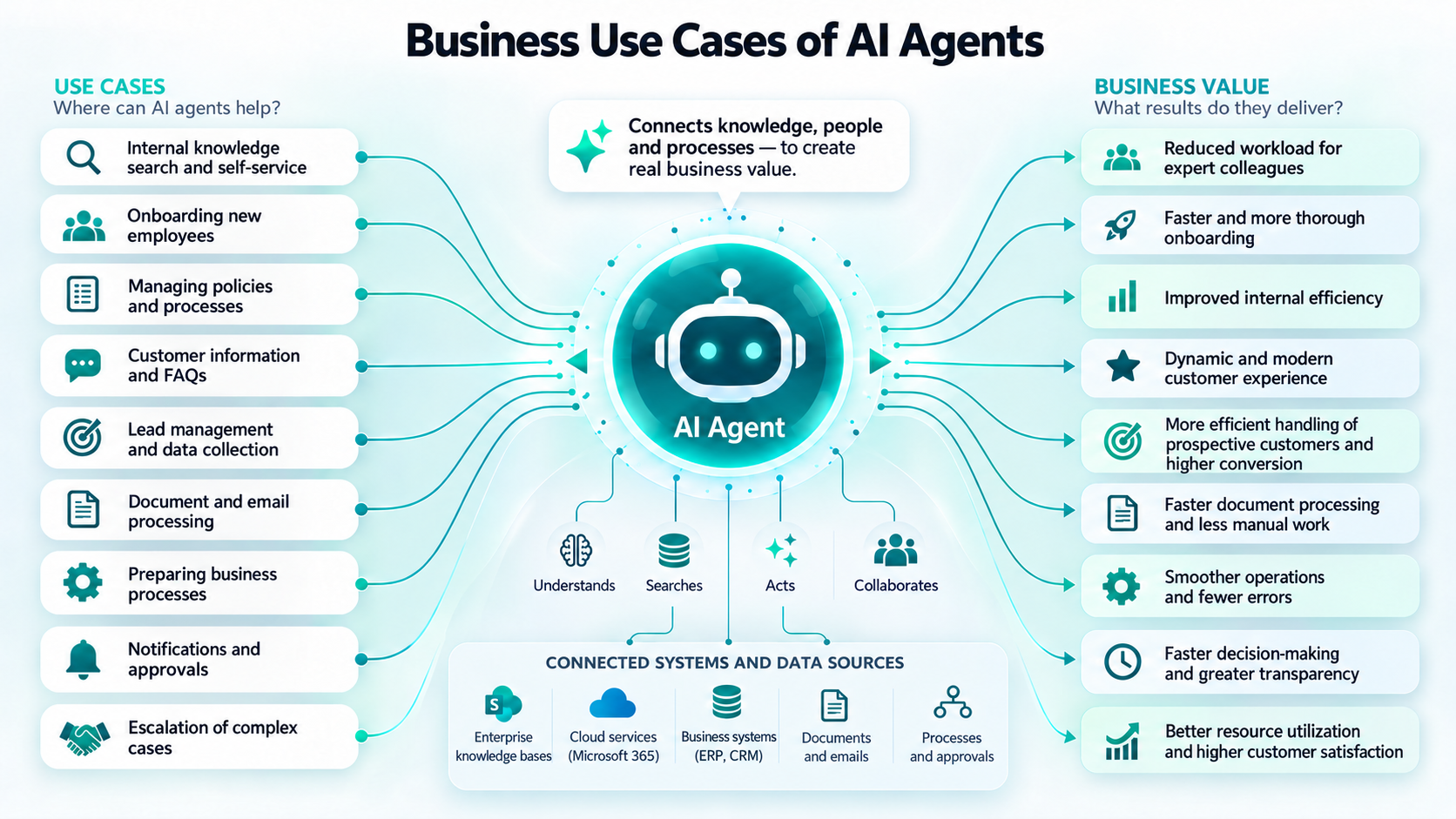
Agents built on corporate knowledge can answer employees’ questions based on internal manuals, process descriptions, and approved documents, while the company itself can define which documents and information sources the agents are allowed to use. This is particularly important when dealing with internal processes, policies, and organization-specific expertise. As a result, employees no longer need to search through lengthy documents, folders, or previous email threads to find a particular piece of information.

Agents can also act as professional knowledge hubs or provide first-line internal support. They can assist junior colleagues in their day-to-day work, support the onboarding of new employees, and handle frequently recurring questions that would otherwise be directed to more experienced colleagues.

It is important to emphasize that agents do not take over experts’ decision-making responsibility. More complex or exceptional cases can still be escalated to the appropriate specialists.

We also discussed the role of human expertise and responsibility in our article about Mr. Bucket.

Customer communication and guided data collection

Agents can also be used to support external customers and prospective clients. Solutions operating on a corporate website or other digital interfaces can answer frequently asked questions based on the product, service, or company information made available to them.

When someone gets in touch or requests a quotation, agents can launch a guided conversation: they collect the necessary information step by step, verify that the required data has been provided, and then forward it in a structured format to the appropriate employee or system. In a similar way, they can also receive service requests and other enquiries, collect the data required for processing, and forward it to the relevant colleagues through Teams or Outlook integrations.

Custom agents can be published in Microsoft 365 Copilot, Microsoft Teams, SharePoint, corporate or public websites, and other business interfaces, in both cloud-based and on-premises environments.

Business operations through a conversational interface

Agents can manage data, process documents, connect different systems, and launch automated workflows. The next level of AI agents is represented by solutions that can carry out specific business processes as well. With agents integrated into Business Central, users can initiate business operations using natural language, while controlled and auditable processes run in the background.

In a procurement process, for example, an employee can specify in conversational form which products and quantities are required. The agents collect and validate the data, after which the background process creates the necessary Business Central documents. Meanwhile, the employee can receive feedback on the status and outcome of the process.

Another example is creating a new item and preparing the related documentation. The agents collect the necessary information, create the item in Business Central, and can then generate a document from a Word template based on the recorded data. The document can also be produced in PDF format and saved to the appropriate SharePoint document library.

The user interacts with a single, unified conversational interface, while multiple Microsoft solutions work together in the background.
Where should you start?

Before introducing AI agents, it is worth defining precisely which problem you want to solve. A question-and-answer assistant built on an internal knowledge base requires a different design from a solution that creates documents or master data in Business Central.

The value of agents should not be assessed solely on the basis of full automation.

Business value can already be created by reducing the time spent searching for information, entering data manually, and carrying out repetitive administrative tasks.

A good place to start is an area where employees regularly encounter recurring questions, frequent manual data entry, or the need to search across multiple documents and systems for the same information. A clearly defined, frequently repeated, and measurable process can provide a strong foundation for implementation. Based on experience, agents can then be gradually expanded with additional information sources, integrations, and business operations.

If you are interested in practical applications of AI, follow Dynago on LinkedIn and visit our blog. And if you would like to explore how AI could be applied to your own business processes, get in touch with our experts.


Thumbnail: OpenAI

https://dynago.hu/wp-content/uploads/2026/10/ai-agent-dynago-thumbnail.png 1024 1536 dynago https://dynago.hu/wp-content/uploads/2021/08/logo_szines_340px.svg dynago2026-10-19 13:42:222026-10-19 13:42:22AI Agents in Practice: When Artificial Intelligence Does More Than Just Respond — It Gets Work Done
dynago

Unlock the Future of Business: Copilot Now Available in the Hungarian Localization of Business Central

2025.02.27./in Dynago /by dynago

We are pleased to announce that thanks to Microsoft’s latest development, the Copilot feature is now available in the Hungarian localization of Business Central. With the 2024 wave 2 (BC25.3) version, this innovative solution has been introduced in Hungary, offering unprecedented efficiency in enterprise resource planning. We have already installed and made the feature available for our SaaS customers, allowing them to be among the first to benefit from this AI-powered assistant. But what exactly can it do?


Introducing Copilot

Copilot is an AI-powered assistant designed to enhance creativity, boost productivity, and eliminate monotonous, time-consuming tasks.

Integrated into the Business Central system, Copilot enables users to ask questions in natural language and quickly access their business data.

For example, users can simply type: “Show me the latest sales order for Adatum,” and the system will immediately retrieve, group the data, perform calculations, and generate detailed analyses. This allows users to obtain relevant information in seconds without needing to use complex search commands.

Copilot is an AI-powered assistant designed to enhance creativity, boost productivity, and eliminate monotonous, time-consuming tasks. (Photo: Microsoft)


What Benefits Does Copilot Offer to Hungarian Users?

The introduction of this new feature represents a major advancement for businesses, providing opportunities that previously required manual work and time-consuming analysis. One of its most outstanding advantages is natural language search, which allows users to access their company data using simple words or questions, without the need to write complex SQL queries similar to programming languages. This significantly reduces search time and enables faster, more informed business decisions.

Another key advantage is real-time data processing, which ensures that Copilot immediately processes requests and provides users with the most accurate information possible. As a result, managers and employees can quickly respond to market changes and adapt to new situations instantly.

While Copilot operates primarily in English, it also supports searches in other languages, including Hungarian. However, it is important to note that linguistic quality and accuracy may differ from the English version, which could affect the user experience. Despite this, the new feature can still be a great asset for Hungarian businesses, offering significant time savings through automated searches and analyses.


How to Activate Copilot in Business Central?

To access and use Copilot, businesses must be running the latest version of Business Central. With the 2024 wave 2 (BC25.3) update, the feature has officially become available in Hungary and has already been installed for our SaaS customers.

If you need assistance with the update or activation of the feature, the DynaGo Hungary customer service team is ready to help. It is worth integrating Copilot into daily workflows as soon as possible, as it can boost efficiency even in the short term.


Step into the Future with Copilot!

Don’t miss the opportunity to support your business with the most advanced technology! Integrated into the Hungarian localization of Business Central, Copilot takes business processes to the next level, reducing manual work, optimizing operational workflows, and gaining a competitive advantage in the digital age. Not only does it save time, but it also allows employees to focus on more valuable, strategic tasks.

Accelerating digital transformation is crucial for your business—implementing Copilot is a significant step in this direction. If you would like to learn more about this feature, feel free to contact us!


Thumbnail: Microsoft

https://dynago.hu/wp-content/uploads/2025/02/copilot_microsoft.png 1080 1920 dynago https://dynago.hu/wp-content/uploads/2021/08/logo_szines_340px.svg dynago2025-02-27 11:44:352025-02-27 12:07:05Unlock the Future of Business: Copilot Now Available in the Hungarian Localization of Business Central
dynago

Azure AI OCR and Business Central Integration – A New Level of Digitalization

2025.01.30./in Dynago /by dynago

Digital transformation is crucial for modern businesses, and one of the most innovative solutions is Azure AI OCR (Optical Character Recognition). This technology automates text extraction from various document formats, reducing manual data entry and enhancing business efficiency. When integrated with Microsoft Dynamics 365 Business Central, OCR automation makes administrative processes more accurate and transparent.


How Azure AI OCR Works

Azure AI OCR leverages machine learning models to recognize both printed and handwritten text in multiple languages. Through Intelligent Document Processing (IDP), it extracts key elements and structural information from documents, supporting both real-time and background processing.


Key Benefits of Integration with Business Central

By digitizing and automatically processing incoming documents like invoices, delivery notes, and orders, businesses significantly reduce administrative workload. The integration allows:

  • Direct connection of OCR APIs to Business Central, enabling seamless data transfer.
  • Structured and accurate data extraction for better business management.
  • Various plugins and extensions for smooth interoperability.


Integration Process

  1. Document Digitization – Paper-based or digital files are uploaded into Azure AI OCR.
  2. Data Extraction & Processing – AI models identify key information and convert it into structured data.
  3. API Integration & Data Transfer – Extracted data (formatted in JSON) is automatically transmitted to Business Central.
  4. Validation & Workflow Automation – Data is validated, processed, and used in purchasing, finance, or inventory management modules. Business Central sends alerts if any data correction is needed.


Business Advantages of Digitalization

  • Reduced Errors & Faster Processing – Automation eliminates manual entry mistakes.
  • Cost Efficiency – Employees can focus on high-value tasks instead of repetitive data entry.
  • Real-Time Updates – Businesses access up-to-date information instantly.


Practical Example: Automated Invoice Processing

  1. A supplier’s paper invoice is digitized and uploaded to the OCR system.
  2. OCR extracts details (invoice number, date, supplier name, item descriptions, amounts).
  3. Data is formatted in JSON and sent to Business Central via API.
  4. Business Central updates procurement and finance records and triggers approval workflows if needed.
  5. The system notifies users for validation, ensuring accuracy.


Conclusion

Azure AI OCR and Business Central integration streamlines business document processing, minimizes human intervention, and enhances administrative transparency. This collaboration not only improves efficiency but also drives digital transformation. The system can be customized for specific business needs, with expert guidance available from DynaGo for implementation.


Thumbnail: Unsplash

https://dynago.hu/wp-content/uploads/2025/01/laptop_unsplash-1-scaled.jpg 1440 2560 dynago https://dynago.hu/wp-content/uploads/2021/08/logo_szines_340px.svg dynago2025-01-30 14:54:462025-02-27 11:42:24Azure AI OCR and Business Central Integration – A New Level of Digitalization

Latest posts

  • AI Agents in Practice: When Artificial Intelligence Does More Than Just Respond — It Gets Work Done
  • Mr. Bucket and AI – What Can an Old Story Teach Us in the Age of Artificial Intelligence?
  • Copilot and AI in Business Central 28: Intelligent Support for Day-to-Day Operations
  • Business Central 28 Takes Logistics, Finance and Quality Management to the Next Level
  • DynaGo Hungary wins Business Superbrands award

Kategóriák

  • Dynago
  • Uncategorized

Címkefelhő

.NET MAUI AI agents AI in business processes artificial intelligence artificial intelligence agents BC28 Business Central Business Central 28 Business Central Copilot business process automation business processes cloud cloud ERP collaboration CRM data data management data quality digital transformation document management DynaGo DynaGo Hungary DynaGo Mobile enterprise resource planning enterprise software ERP ERP system ERP update ERP upgrade field service inventory management Microsoft Microsoft Business Central Microsoft Copilot Microsoft Dynamics 365 Microsoft Dynamics 365 Business Central mobile application mobile ERP system Newsfeed Payables Agent productivity Sales Order Agent team collaboration warehouse management workflow

Privacy policy

Copyright 2021 Dynago

Scroll to top
Weboldalunk működtetése során a felhasználói élmény növeléséhez illetve a jobb kiszolgálás érdekében oldalunk “cookie”-kat használ. További információk
BeállításokElfogadom
Manage consent

Privacy Overview

This website uses cookies to improve your experience while you navigate through the website. Out of these, the cookies that are categorized as necessary are stored on your browser as they are essential for the working of basic functionalities of the website. We also use third-party cookies that help us analyze and understand how you use this website. These cookies will be stored in your browser only with your consent. You also have the option to opt-out of these cookies. But opting out of some of these cookies may affect your browsing experience.
SAVE & ACCEPT
  • English